How to Choose a Touchscreen for Agricultural Machinery
- Share
- publisher
- JuTouch
- Issue Time
- Oct 16,2026
Summary
A practical engineering guide to specifying a touchscreen for tractor, sprayer and harvester cabs: sunlight readability and optical bonding, glove and wet-hand touch, wide-temperature behaviour, vibration, sealing, EMC, lifecycle supply, and the eight validation tests to run before you commit a display module.
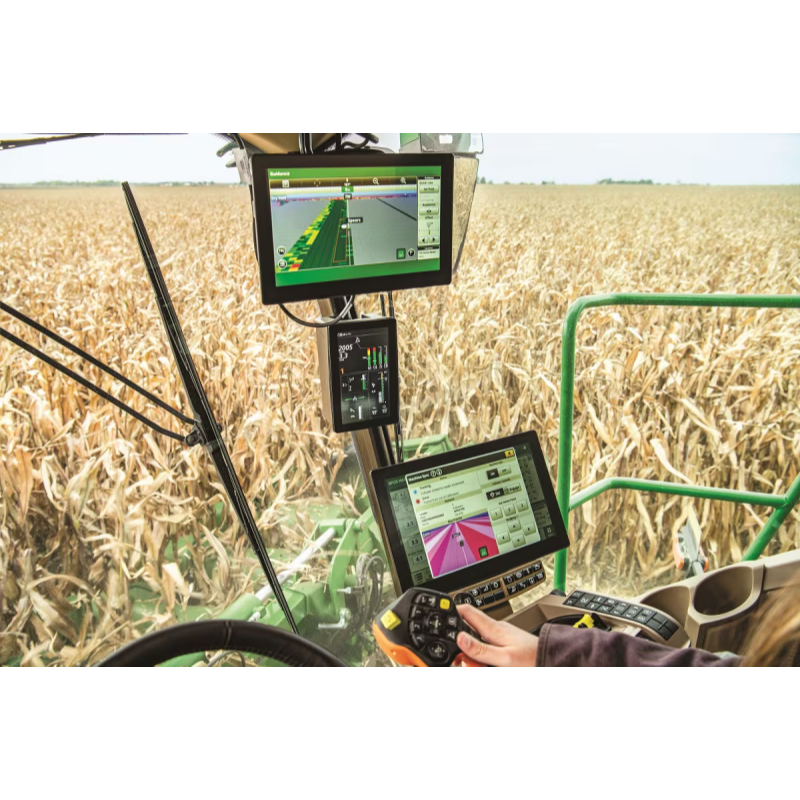
A tractor cab is one of the hardest places on earth to install a touchscreen. Direct sun through a glass roof puts more than 100,000 lux on the panel face. The operator is wearing leather gloves and is not going to take them off to change a spray rate. The machine shakes all day, gets hosed down at night, cranks a 24 V system through a cold start in February, and is expected to still be in production eight years from now. Most agricultural HMI failures in the field are not random. They trace back to a handful of specification decisions made during selection — brightness specified without an optical stack, glove touch validated with a bare finger, a temperature range that covers the ambient but not the panel surface, a display module with no supply commitment behind it. This guide walks through those decisions in the order an engineering team actually faces them, and closes with the validation sequence to run before you commit a module to a platform. It is tempting to reuse a factory HMI panel that already passed qualification. It usually does not survive a season. The gap is not quality — it is that the agricultural environment pushes several parameters past the industrial envelope at the same time. The last row is the one that catches teams late: a combine platform often stays in production longer than the display module inside it. Brightness gets quoted first because it is easy to put on a datasheet, but contrast survives sunlight, not nits. An unbonded cover glass adds two air-to-glass reflections of roughly 4% each — around 8% of ambient light bounces straight back at the operator, and that is what actually washes the image out. Optical bonding replaces the air gap with optical-grade adhesive and cuts reflections to around 1%, so a bonded 1000-nit panel reads far better than an unbonded 1500-nit one. Practical targets: Specify the surface stack, not just the backlight: AG (anti-glare) to diffuse specular reflections, AR (anti-reflective) coating to cut residual reflection, AF (anti-fingerprint) for cleanability. If your operators wear polarised sunglasses — many do — ask for a circular-polariser-compatible stack, otherwise a quarter turn of the head makes the panel go black. Projected capacitive (PCAP) touch is the right default for a modern cab UI, but “supports glove touch” on a datasheet often means a 1 mm cotton liner. Agricultural gloves are leather, insulated or nitrile-coated, and can be 3–5 mm thick at the fingertip. What to ask a supplier to tune: Ambient temperature is not operating temperature. Under solar load a cab-mounted panel surface can reach 70 °C while the outside air reads 35 °C, and a cold start at −25 °C ambient means the LCD itself starts below −20 °C, where liquid crystal response slows and the image visibly smears for the first minutes. Agricultural vibration is broadband and continuous — engine, terrain and implement all contribute. The reference profiles worth naming in a test plan are ISO 5008 (agricultural vehicle vibration measurement) and IEC 60068-2-6 (sinusoidal vibration), with IEC 60068-2-27 for shock. Design details that matter more than the rating: Agricultural equipment gets pressure-washed, and the cleaning agents are often worse than the field: fertiliser residue, pesticide concentrates, ammonia-based cleaners, diesel. A display that is rock solid on the bench and randomly resets in the machine is almost always an electrical integration problem. Agricultural machinery has its own EMC family — ISO 14982 for agricultural and forestry machinery — and the 12 V / 24 V electrical environment follows the same transient reality as road vehicles: ISO 7637-2 for conducted transients and ISO 16750-2 for electrical loads. A machine platform outlives a display module. When a panel goes EOL the cost is not the new screen — it is re-validating structure, optics, touch firmware and EMC, plus the production stop while that happens. Bigger is not automatically better — the panel has to fit the cab, the arm mount and the operator's glance pattern. What matters is that the primary numbers can be read peripherally while the operator watches the field. Resolution guidance: 1280×720 or better if you render field coverage maps; 800×480 is still fine for a dedicated implement control screen. Keep glance-critical elements — cross-track error, section status, tank level — large and high contrast rather than detailed. Eight tests, in this order. They catch most of what would otherwise reach the field: Test on your own housing and your own mainboard. A module that passes on a supplier's demo board tells you much less than one that passes mounted in your bezel. Agricultural machinery is a small-batch, many-model business. A terminal variant for one market might be 300 units a year. That volume profile collides with how large display manufacturers work: high MOQs, distributor routing, and no original FAE when something misbehaves. Three problems worth solving before you pick a supplier: This is the gap JuTouch works in: capacitive touch panels, TFT LCD modules and integrated touch display modules for agricultural and construction vehicles, built around flexible MOQ, real-environment tuning — glove, wet-hand, sunlight-readable, EMI-resistant, wide temperature — and 5–7 year supply commitments with locked BOMs. Engineering works directly with your team from sample to production, in sizes from 2.8" to 55".Why agricultural HMIs fail more often than industrial ones
Environment factor Typical industrial HMI Agricultural cab reality What it breaks Ambient light 300–800 lux, sheltered >100,000 lux, sun moves across the panel all day Unreadable screen; operators shading it by hand Operator input Bare finger, thin glove Leather, insulated or chemical-resistant gloves; wet or muddy hands Missed taps, accidental activation Vibration Fixed machine frame Engine + terrain + implement, broadband, all day Connector fretting, FPC cracks, solder fatigue Contamination Oil mist, coolant Dust, mud, fertiliser, pesticide, ammonia, pressure washing Gasket failure, corrosion, ink fading Temperature 0–50 °C conditioned −25 °C cold start to 70 °C panel surface under solar load Slow boot, ghosting, backlight decay, blackout Electrical Stable mains-derived DC Cranking dips, load dump, alternator noise, long harness runs Reset loops, touch drift, flicker Product lifecycle 3–5 years Platforms run 8–15 years with mid-life updates EOL panels force re-validation The seven specs that decide whether a display survives the field
1. Sunlight readability: brightness is only half the job
2. Glove and wet touch: test the actual glove, not the datasheet
3. Wide temperature: specify the panel surface, not the weather forecast
4. Vibration and shock: bonding is structure, not optics
5. Sealing and chemical resistance
6. EMC and electrical: the failure nobody reproduces on the bench
7. Lifecycle and integration: the spec that costs you the most later
Picking size and resolution for the cab
Size Typical resolution Where it fits Notes 4.3" – 5" 800×480 Compact implements, seeders, secondary control pods Space-constrained dashboards; keep the UI to one job 7" 800×480 / 1024×600 Volume workhorse for tractors, sprayers, small harvesters Most common ISOBUS VT size; mounting ecosystems exist 8" – 10.1" 1024×600 / 1280×800 Guidance + implement control + camera view on one screen Enough area for split-screen map and implement status 12.1" 1024×768 (XGA) Combine and forage harvester terminals Legacy-friendly XGA mapping; common VT format 15.6" – 21.5" 1920×1080 Large cab consoles, dual-operator machines, retrofit stations Needs a proper mounting arm; brightness and weight go up How to validate a display before you commit
Where small-batch OEMs get stuck